Distinctive Icons Provide Desktop Scenery And Enhanced Navigation: VisualID
When you're looking for a particular folder or file on your computer, some people will prefer to identify it using graphical icons, whilst others will prefer to use the textual descriptor. For example, with Windows Explorer in Windows XP, you have the option to view the contents of a folder either as Thumbnails, Tiles, Icons, List or Details. However, when it comes to identifying or memorizing factual data, it is generally accepted that people find pictures far easier to remember that text.
But no matter what your preference is, finding a file or a specific folder on anyone's desktop has become as difficult as finding a car in an American parking lot.
Scenery is what is missing. "In current GUIs everything looks the same, and finding a particular file is as difficult as finding your car in a big parking garage." (Source: Idiom)
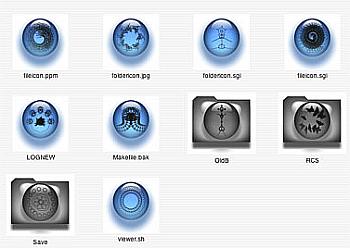
Image source: University of Southern California
Technology Research News has a fascinating article, entitled "Automatic icons organize files", which looks at work being carried out by researchers at the University of Southern California, the Massachusetts Institute of Technology (MIT) and ESC Entertainment aimed at improving the "lost-in-cyberspace problem with a tool designed to tap people's facility with pictures".
"The system, dubbed VisualID, automatically generates detailed icons for specific files. It assigns similar icons to related files by mutating the original icon in a series. The degree of mutation depends on the degree of similarity of the file names, which gives the user an approximate visual sense of saliency, according to J.P. Lewis, a researcher at the University of Southern California.
A sticker-dispensing version of the system allows icons to be put on real-world objects as well.
The idea is to allow people to use the visual sense to identify files and objects in order to improve computer navigation and real-world organization, said Lewis. The icons are not meant to replace textual information like file and objects names, but augment them, he said."
"In a practical system, a VisualID would be created automatically whenever a new file is created, said Lewis. If a person is working on a quarterly report, for instance, the folder containing the project would have several document files, some spreadsheets, some figures, and some notes. And as a person is working she would need to locate and open various files.
When the person looks for a particular file he will notice almost unconsciously its VisualID, or appearance, and after opening a file a couple of times he will likely find himself looking first for the VisualID, and then confirming that it is the correct name, said Lewis.
The system "exploits the fact that appearance is efficiently learned, searched and remembered, probably more so than file names," said Lewis. "Psychological research has shown that searching for a picture among other pictures is faster than searching for a word among other words."
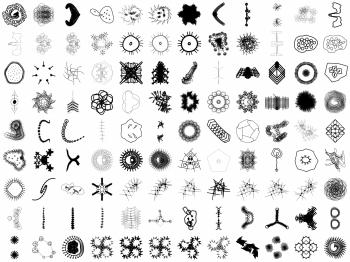
Image source: University of Southern California
The bottom line is that interfaces need scenery, said Lewis. This is readily apparent. "When we look for a book on the bookshelf, we look for it by appearance first, rather than scanning every title one-by-one," he said. "As... memory fades, the appearance of a book often stays with us longer than the exact title; people frequently say things like 'that red calculus book'."
Research on enhancing navigation and spatial data display shows that they require distinctive appearance, or scenery, in order to be effective, said Lewis. The appearance of individual files in current graphical user interfaces is akin to a parking lot or garage where everything looks the same, causing people to get lost easily, he said."
As we continue our love affair(s) with information, but become increasingly desperate to manage our relationships more efficiently, developments like these are essential.
Reference: Technology Research News [ Read more ]


blog comments powered by Disqus