November 27, 2003


iChat Breaker - Squidcam Makes Mac And PCs Videoconference At Once


SquidCam is a video and audio chat application enabling you to have a conversation with one or more people using SquidCam over a network (LAN and/or Internet) connection.
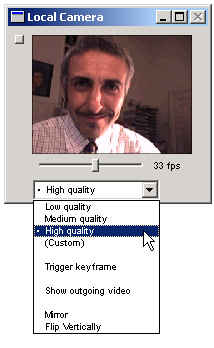
squidcaminterfaceone.jpg

SquidCam features audio and video connectivity, text messaging, and an automated video answering machine, all without the need of a special service.

Squidcam presents an extremely simple and intuitive user interface that takes zero time to be learned.

Among the cutting-edge features are:

1) a variable video frame rate allowing the user fine control on the amount of bandwidth and quality used during a session.

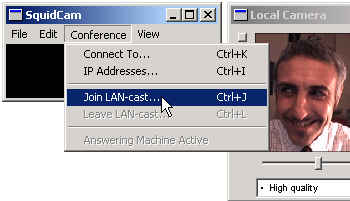
2) a LAN-based video conferencing mode that allows easy and immediate multi-party conferences on an internal network.

3) Support for many NAT and routers configurations (it supports AirPort).

4) Integrates a custom video scale option, and support for all aspect ratios and resolutions to a maximum of 1280x1024!

lancast.jpg

According to beta testers reports and my initial testing performance can be expected tom be better than iChat in several instances and audio quality seems not to degrade over time.

Customer support is very responsive and lots of useful and clearly written information is available on the SquidSoft Web site.

Release 1.5 of Squidcam for Mac OS X is now available and it offers full audio and video conferencing between people on Mac OS X and Windows PC users.

The Windows version is still in beta but it is reportedly stable and well performing. Please see detailed user comments at VersionTracker.

The Squidcam application is less than a megabyte in size and it fits on a standard floppy diskette.

Squidsoft provides also an excellent and up-to-date list of all audio-video devices supported by its new cutting-edge technology. Please see a full list of Squidcam supported peripherals here.

Free try-out downloads:

Download SquidCam v1.5b4 (Beta) for Windows (442k)

Download SquidCam v1.4.1b30 (Beta) for Windows (424k)

Download SquidCam v1.5 for Mac OS X (656k)

How much does SquidCam cost?
SquidCam is $25 US. The unregistered version has certain limitations, while the registered version gives you unlimited access to all features.

Limitations in the unregistered version are:

  • A maximum of five minutes per chat session
  • Only one incoming call per application session (i.e. you may only receive one call each time SquidCam is executed)
  • A single, five minute LANcast session per application session

    System Requirements:
    Any Macintosh computer running MacOS X (minimum of 10.1.5 recommended; compatible with MacOS X 10.2) or Windows (Win2k or WinXP recommended).
    A dual ISDN line (128 Kbps) connection is the minimum recommendation for using Squidcam.

  • Conversation Tags:
    Readers' Comments    
    2004-07-21 08:00:14

    cefe rino

    ¿is this software able to connect to netmeeting?


    Recent Articles


    September 1, 2008
    Online Collaboration Tools - New Technologies And Web Services - Sharewood Guide Sep01 08


    If you want to increase the effectiveness with which you collaborate with your geographically dispersed team-mates this new set of online collaboration tools should come in handy. Among the new collaboration tools I have selected for you this week: a co-browsing facility, a new way to... read more


    August 30, 2008
    Media Literacy: Making Sense Of New Technologies And Media by George Siemens - Aug 30 08


    What will look like education in the future? Are we going to see a revolution in the education system we have built in the last 100 years or a dissolution of the same as new approaches to education and learning slowly contaminate our fast changing society?... read more


    August 26, 2008
    Business Planning: Key Action Steps To Build A Successful Internet Startup


    Launching a new Internet startup? Wondering what are the key things to worry about before it's too late? Do you need a business plan or do you need a great team and a cool idea to run with? Photo credit: Leli456 When launching a new Internet startup, that... read more


    August 25, 2008
    Online Collaboration Tools - New Technologies And Web Services - Sharewood Guide Aug25 08


    Co-browsing systems, file sharing tools, polling and feedback services are just some of the great services Robin and I have hand-picked and tested for you in this new issue of our weekly online collaboration Sharewood guide. Photo credit: Jenny Solomon Here all of the online collaboration tools we... read more


    August 23, 2008
    Media Literacy: Making Sense Of New Technologies And Media by George Siemens - Aug 23 08


    How can the educational system we pay for via our taxes change and transform itself into a new way to prepare our young people for an even faster-changing future? Are there alternatives out there? Photo credit: D'Arcy Norman As I have promised you last week, George Siemens... read more


    August 18, 2008
    Online Collaboration Tools - New Technologies And Web Services - Sharewood Guide Aug18 08


    If you are looking for web-based collaboration tools to manage your team projects and tasks, create wiki pages or interactive message boards, Robin and I have picked some really cool new online collaboration apps for this new issue of this weekly Sharewood Guide. Photo credit: Michael... read more


    posted by Robin Good on Thursday, November 27 2003, updated on Saturday, January 21 2006


    Understanding comes from exploration

    Home | Subscribe | RSS Feeds | Site map | Syndicate
    Consulting | Publications
    About | Privacy | Contact


    Creative Commons License
    This work is licensed under a Creative Commons License.


    View blog authority


    943