MasterNewMedia by Robin Good
MasterNewMedia Interface Design Contest
Design Submission by Ghazali Ridzwan
Ref. site URL: Webguy's Webspace
Bio:
My name is Ghazali Ridzwan, 25 years old, and I am an independent web designer, web developer and web programmer. My aspiration and passion is to design and develop web sites or web applications that helps makes things easier, more convenient, and less expensive for people, businesses or organizations in targeted markets locally, or all over the world. In line with this passion, I founded and currently manage a small web development company called ANTARAMEDIA - www.antaramedia.com , which focuses on creating web sites and solutions that helps achieves peoples online goals. I also do web design and development work, on a freelance basis from time to time. My blog can be found at http://webguy.antaramedia.com . I can also be reached at webguy@antaramedia.com .
Design Submission by Ghazali Ridzwan
Ref. site URL: Webguy's Webspace
Bio:
My name is Ghazali Ridzwan, 25 years old, and I am an independent web designer, web developer and web programmer. My aspiration and passion is to design and develop web sites or web applications that helps makes things easier, more convenient, and less expensive for people, businesses or organizations in targeted markets locally, or all over the world. In line with this passion, I founded and currently manage a small web development company called ANTARAMEDIA - www.antaramedia.com , which focuses on creating web sites and solutions that helps achieves peoples online goals. I also do web design and development work, on a freelance basis from time to time. My blog can be found at http://webguy.antaramedia.com . I can also be reached at webguy@antaramedia.com .
|
MasterNewMedia Home Page Proposal |
 | |
 | ||
| MasterNewMedia Individual Article Proposal |
 | |
|
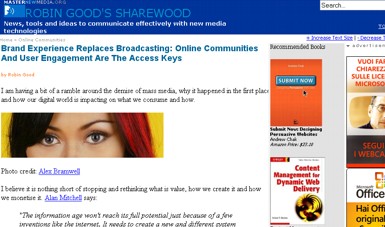
Explanations for the home page: Dear Mr. Robin Good, First off, I would like to thank you for providing an excellent resource of knowledge, insights, opinions and facts on the tools, news and ideas to communicate effectively with new media technologies at Masternewmedia.org . I am an avid reader of your website, and I find your insights accurate, your opinions although some are somewhat controversial, it is correct and I agree on most issues, reviews and ideas you publish. I certainly believe that Masternewmedia.org , is one of the best websites out there, because of the great content it delivers. Nevertheless, although I always believed that the current design of MasterNewMedia.org is a good design, it could always be better. That is why I decided to enter this competition, hopefully to improve the design of MasterNewMedia.org, making it easier to navigate, reading and accessing information, and usable than it already is. And I would also very much like the opportunity to work with or just be part of MasterNewmedia, which I believe offers a great contribution to people all over the world. The goal of the new design homepage is to provide repeat visitors access to the newest information, while enabling new site visitors to discover Masternewmedia’s wealth of excellent content and articles, in an easier and more convenient way to navigate. Header The header (blue) is designed to be simple, yet effective, providing users the title of the site and tagline prominently, so users know what this site is all about at a glance. The background of the heading of course can be changed to something else from time to time depending on the occasion. On the right hand corner is a prominent search box, enabling users to easily search for content, while directly beneath it is a drop down menu under the link ‘TOPICS’ that drops down revealing the main topics of discussion in Masternewmedia when hovered over. The HomePage On the top fold of the page, directly beneath the header I have decided to place what I call a ‘Splash Image’, where the feature article is presented, (this can be like’s cnet’s homepage) , where feature articles are presented in a slideshow manner. This enables visitors to easily find the newest information, that they are most likely to be interested in. Directly next to the splash image is what I call the ‘action area’, where you can insert items that you want the user to take action to. In this example , it is the subscription to Masternewmedia's newsletter, but it can also be changed to something else such as a poll, survey, etc. as wanted. The placement is designed to be prominent, so users would not miss it. This will likely enhance the interactivity from site visitors. Below, you can see snippets of information arranged tidily under their corresponding headings. Corresponding RSS buttons next to the headings are placed so users can easily subscribe to the topics they’re interested in. This design is to allow users to glance through and get to where they want much more easier without scrolling too much as with the previous design. Under the MasterNewMedia Network News, users can find headlines from other masternewmedia sites, under tabbed headings. A photo of Mr. Robin Good, with contact info is placed on the homepage, so users can learn more about the person behind the site. Other sections of the homepage are advertisement areas, prominently displayed on the right side, which blends in with the site design, while not obtrusive to users, and below, for banner like advertisements/ or google ads. In general, the homepage was designed to be a bit more user friendly, providing focus to the latest or important information, while giving accessibility to other parts of the website in a more organized manner. This in turn offers users a more rewarding user experience, while keeping the website clean, minimalist, and easy to use. Explanations for the article page: The articles page is designed to be more organized, while emphasis is given on the articles usability and legibility. Users can increase or decrease the default article text size , by clicking on the corresponding links (+Increae text size | - Decrease text size) on the top right corner, providing great usability for users that prefers large fonts or smaller fonts to read. I’ve also decided to add a breadcrumb feature ( Home Topics Articles ) , so users can trackback easily, while not getting lost on the site. Just next to the article is a strip section, where The Recommended Books are placed more prominently. Below are other items that can be placed relevant to the article such as Relevant Topics, and relevant google ads. Directly below the article (under a green background) is a +Post A Comment link, when clicked reveals the comment box for users to directly type in their comments, without reloading the page. This hopefully, enables users to post comment much more easier, increasing the participation factor and adding more value to the article. An author brief is placed directly beneath it, adding personality to the article, so users can discover the author more, if they choose to. Next to it, is the main links under the ‘Share the goods’ heading. In general, the articles page is designed to be a bit more organized, while retaining the usability factor, and it was designd to make it easier for users to post comments. The overall goal of the design was also to make the pages load fast, even on slow connections, so graphics were used only sparsely, where necessary, while css styles were used instead to make the design a bit more attractive and colorful. | ||